Essential Biopharma Software for R&D Data Management

Biopharma software is an essential tool for managing R&D data of modern biotech organizations. Biologics development is a data-driven endeavor involving many development stages and cross-functional collaboration. The inherent complexity, variety of disciplines producing data, and the sheer volume of data can easily pose a challenge to biopharma research organizations. Many research teams are using general-purpose data management tools (spreadsheets and files) or systems purpose-built for a single data type. This approach can lead to problems in tracking data and duplicating work. This blog post focuses on key considerations when selecting biopharma software for managing R&D data. 

biopharma software

Biopharma data management challenges include:

  • Integrating data generated from disparate scientific specialties
  • Difficulty in finding and highlighting important data (leading to duplication of work)
  • Variabilities in data structure and conventions
  • Lack of visibility into data provenance

These challenges make it difficult for biopharma researchers to answer some basic scientific questions about their data:

  • Do I have the data I need?
  • What is this data? (structured data model, definitions)
  • Where did this data come from? (data provenance, audit history)
  • How and why was it generated? (reproducibility, workflow processes)

Biopharma software can help centralize research data and enforce data standards. This allows for quick and confident answers to the questions scientists ask about their data. Along with data capture, standardizing and monitoring processes is critical to tracking biopharma R&D activity and reducing data inconsistencies.

Biopharma software should include integrated tools for data management.

The LabKey Biologics LIMS provides a central bioregistry with integrated assay data capture, workflow management, and a “data-connected” electronic lab notebook. We consider these to be the pillars of a comprehensive biopharma software solution for data management.

Bioregistry

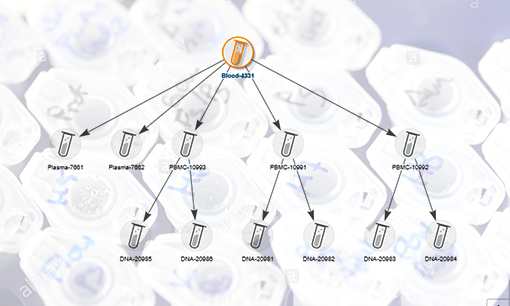
A bioregistry helps scientists define, register, and review interconnected biological entities and their samples. By centralizing biopharma R&D data, researchers can easily find, view, and navigate through entities, their lineage, and data relationships. For example, using a bioregistry, scientists can easily find a specific molecule and see all the related sequences, samples containing it, and related assay data.

Assay Data Management

Assay data is the decision-making criteria for discovery, process development, and quality. It is generated by all contributing teams and its relevance endures throughout. Having a central, structured, and workflow-related assay data capture mechanism is essential for streamlining decision making, hand-offs, and post hoc analysis. It ensures that consistent data structures are used throughout the biopharma development process, sets expectations for needed data, and makes clear where critical data can be found.

Electronic Lab Notebook

An ELN is designed to help scientists efficiently organize and document their ongoing research. A data-connected ELN provides even more value by having access to the bioregistry, assay, and sample data captured so that additional work is not required to find and include it. This integration paradigm maintains data integrity while enabling easy data exploration and collaboration.

Workflow Management

Defining collaborative biopharma workflows helps set expectations for contributors and managers. It supports the fulfillment of material and data needs and prepares the way for process optimization, scheduling, and cross-team alignment. These workflow tools facilitate strategic experimentation, simpler data hand-off, and easier planning.

Biologics LIMS- Biopharma R&D software designed for efficient data management.

Biologics LIMS is a powerful suite of integrated tools to help scientists manage biologics research data, improve lab processes, and collaborate efficiently. The software provides biopharma researchers with streamlined registration and tracking of biological entities and samples in a central bioregistry. The bioregistry is seamlessly integrated with tools for workflow management, assay data management, and an electronic lab notebook (ELN). This combination of software tools forms a cohesive application that serves as a central hub for managing biotherapeutic development data, processes, lab notebooks, and collaboration efforts.

LabKey Biologics helps scientists:

  • Speed up decision-making with unified ELN, bioregistry, workflow, and assay data management tools
  • Centralize and connect data for a holistic view of your data landscape and interrelationships
  • Manage and optimize lab processes with a workflow tool designed for biopharma R&D

Click here to learn more about LabKey Biologics and take a product tour.

Scientific Collaboration with LabKey Sample Manager

Many researchers are continuously seeking ways to boost scientific collaboration. As with other disciplines, enabling scientific collaboration requires the right tools and processes. This is especially true when researchers are sharing samples that need to be tracked at each step of their lifecycle. For some labs, collaborative sample tracking involves a piecemeal approach of emails, spreadsheets, and whiteboards to give teams some visibility into the next steps, assigned work and upcoming projects. This method of sample tracking is highly prone to error and can easily get unwieldy as a lab grows or the complexity of sample processing increases. 

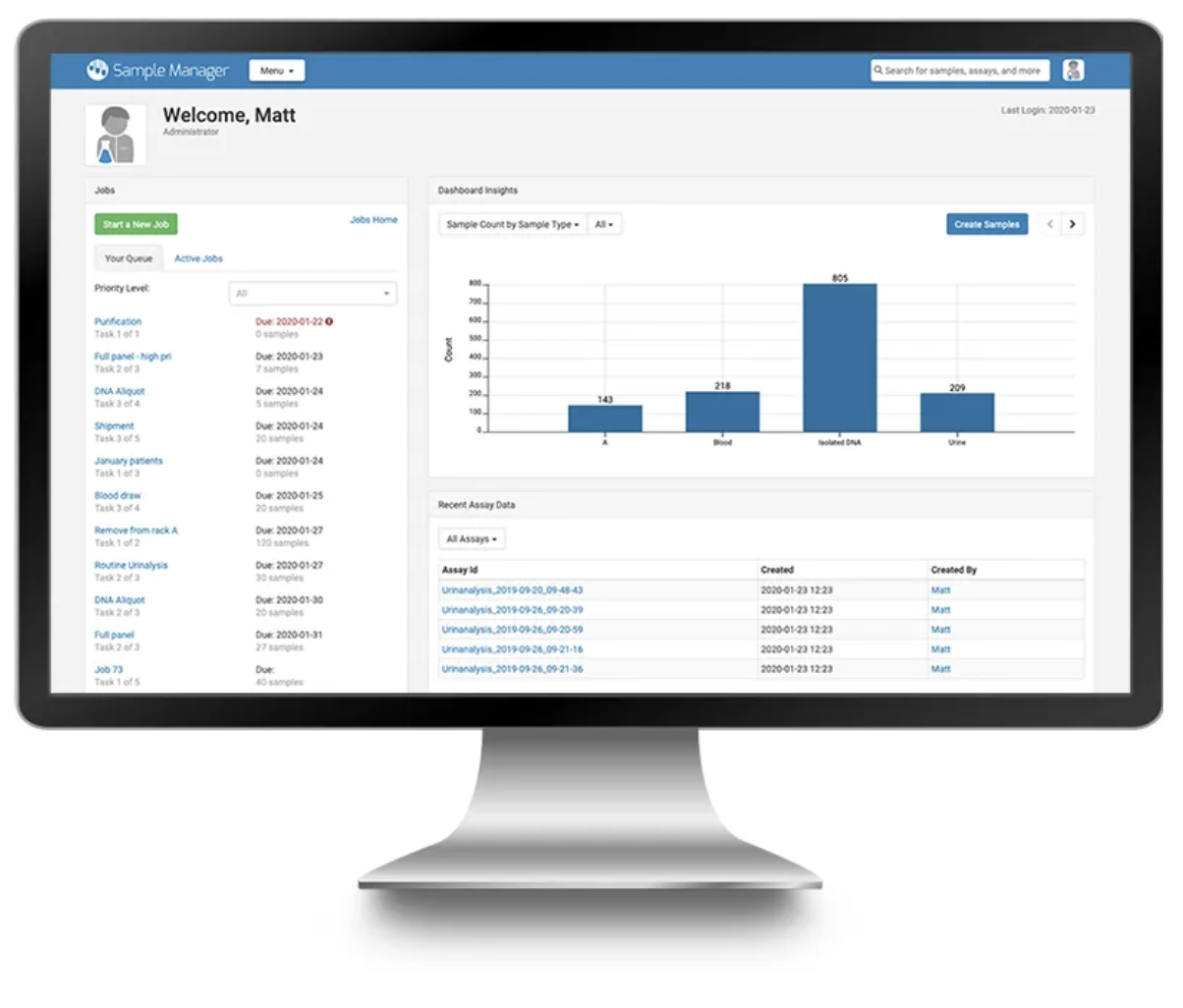
Finding a sample management software that tracks samples throughout their life cycle while also enabling scientific collaboration is imperative for the modern laboratory. Sample Manager has been designed by scientists, for scientists, to help get work done in the lab. We have created a tool that integrates sample registration, storage, experimental data and work assignment for doing all your sample-related work in a single application. Below are a few features that help enable scientific collaboration in the lab.

Workflow Management for Scientific Collaboration

Our task-based lab workflow management tool allows teams to capture the exact work that needs to be performed on samples. Using customizable templates, labs can easily standardize processes and create workflows that accurately reflect their SOPs. Common lab processes like sample receipt, shipping preparation, processing, and assay requests can all be managed using the Sample Manager workflow tool. For each workflow, samples are selected for inclusion in the job, tasks are assigned to individual team members, and notifications communicating the status are sent. The ability to set due dates and the priority of the work allows teams to plan and prioritize work appropriately. 

Freezer Management/Sample Location Tracking

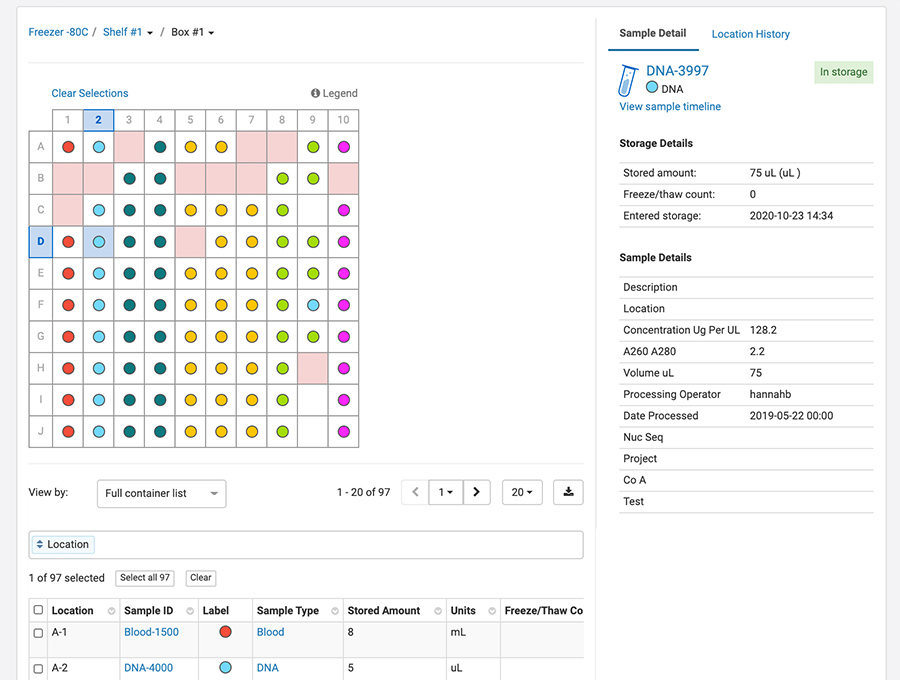
Our sample-centric freezer management tool gives teams insight into freezer capacity and the physical storage of samples. Team members efficiently work in an intuitively designed virtual freezer environment, capturing notes for freeze/thaws and displaying those in the Sample Timeline. Users can quickly understand storage capacity, relative sample breakdown, and overall sample status across storage units in the lab.

Picklists

Teams can create private or public Picklists of samples to generate pull lists, manifests or any other type of list that would be useful for tracking and sharing samples. Sharing picklists with team members enables visibility into user-curated lists of samples and reduces the need for exporting, printing and emailing lists of samples to team members. Shared Picklists can be used to print labels, check samples in and out storage, and add samples to workflow jobs. 

Click here to learn more about Sample Manager and take a tour!

What’s New in LabKey 21.7

LabKey Server

  •  File Watchers – Use file watchers to automate the import of sample and assay data.
  •  Ontology Concept Picker – Improve data entry by guiding users to a specific part of the concept hierarchy.

Sample Manager

  •  Study/Sample Integration – Add samples to studies and associate them with specific participants and timepoints.
  •  Aliquots – Create aliquots of samples singly or in bulk.
  •  Picklists – Create and manage picklists of samples to simplify operations on groups of samples.
  •  Move Storage Units – Track movement of storage units within a freezer, or to another freezer.
  •  Barcode/UniqueID Fields – A new field type, “UniqueID”, generates values when samples are added to a Sample Type or when the barcode field is added to an existing sample type.

Biologics

  •  Electronic Lab Notebooks have been added to LabKey Biologics. Link directly to data in the registry and collaboratively author/review notebooks.
  •  Hide Sequence Fields – Nucleotide and Protein Sequence values can be hidden from users who otherwise have access to read data in the system.

Premium Resources Highlights

Click here to read the full 21.7 Release Notes

5 Electronic Lab Notebook Features Scientists Can’t Live Without

ELN features An ELN (electronic lab notebook) is an essential software tool for documenting experiments, reviewing compiled results, detailing meaningful conclusions, and collaborating with team members. As scientists work with increasing volumes of data, concerns over data reproducibility, data integrity, intellectual property and security/compliance have led to the wide ELN adoption in nearly every scientific discipline. Once viewed as little more than a paper-on-glass/word-processing application, ELN features have grown to meet the complexities of modern-day research. Below we outline some essential ELN features to look for when evaluating an electronic lab notebook for your organization.

ELN Feature Areas to Consider:

1- Ease of use
The ELN you choose should be easy to use and implement. This is especially critical in driving adoption within the organization. That means the user interface should be intuitive for common functions. Ideally, your new ELN should not require extensive training to learn nor require sophisticated integrations with other software to be useful.

2- Templates
The ability to create and use templates of common notebook forms saves time by reducing duplicative work. The ability to quickly modify templated entry types is an essential feature for saving time and improving overall work satisfaction. By creating templates for specific scenarios such as purifications, cell passaging, or repeated analytical work, your team can save time and standardize the formatting of notebook entries.

3- Data Links/Connection
Compiling data for meaningful write-up and conclusions should not require a huge investment of time and effort. By far the easiest way to surface data is for your ELN to have direct access to your underlying data management system that captures the data. This puts your relevant data at your fingertips while authoring and only external data will require effort to incorporate. Directly referencing data not only saves time, it also promotes data integrity and ensures that valuable data remains at the forefront of the decision-making process during the R&D lifecycle.

4- Attachments and Images
External files and images are important components of complex workflows. It should be easy to incorporate them into notebook entries in various formats such as pressure traces, spreadsheets, images, CoA’s or other QC documents, and SOP’s. The ability to bind these files with your signed notebook contents and view the attachments with a notebook entry can also be a huge time saver.

5- Collaborative Features
In the highly collaborative research environments of today, it is essential to have an ELN that makes it easy to work with other contributing scientists. The ELN should support collaborative authoring and a streamlined sign-off/review process for notebooks. It should be easy to find the notebooks that need your attention, comment or review. You should also receive reminder notifications for these actions when you aren’t in the application. These collaborative features facilitate important discussion and encourage timely and accurate documentation of work.

About the Biologics LIMS ELN
Biologics LIMS includes a full-featured electronic lab notebook seamlessly integrated with the Bioregistry, Assay Data and Workflow Management tools. This user-friendly ELN allows scientists to:

  • Save time authoring and reviewing notebooks with templates, notifications and an intuitive interface
  • Highlight valuable data by linking directly to bioregistry entities, samples and assays
  • Collaboratively document and discuss notebook entries and referenced data

Click here to learn more about LabKey Biologics.

What Is a Bioregistry?

From cell lines and constructs to their vectors and insert sequences, biotherapeutic development involves many moving parts that need to be defined and connected. Using spreadsheets to manage this data and their inter-relationships is a highly inefficient and error-prone endeavor. Without a central bioregistry to capture and track all of these pieces, researchers could end up with data that is inaccurate, redundant, and insufficient. 

A bioregistry is a structured data repository that helps scientists answer a multitude of questions during the biotherapeutic development process. By efficiently attaining answers to those questions scientists can make data-driven decisions, increase efficiency, and trust the integrity of their data. Time is precious in biotherapeutic development and reducing duplicative efforts and time wasted in finding entity information can be highly advantageous to most organizations. 

Adopting a bioregistry can provide biopharma organizations with the following benefits:

What is a bioregistry?

  • Centralization of information for critical biological entities and protection of intellectual property
  • Eliminating duplication and improving data integrity by verifying the uniqueness of entities upon registration
  • Creation of links between samples, entities, electro nic lab notebooks and entity creation processes (protein, expression, purification, characterization)

The LabKey Biologics Bioregistry

LabKey Biologics includes a fully integrated bioregistry as part of a suite of integrated software tools for biotherapeutic development. The bioregistry captures complete entity and sample information for molecular entities, nucleotide sequences, protein sequences, expression systems, constructs, vectors and cell lines. Researchers can easily navigate through entities and their relationships. For example, researchers can find a specific molecule and see the component sequences, the samples of that molecule and the assay data associated with those samples.

Click Here to learn more about LabKey Biologics and take a tour!

Benefits of Sample-centric Freezer Management Software

Most freezer management software aims to be a mirror image of a lab’s freezer space. Samples are assigned location in the freezer at the same time as they are entered into the system, and removed from the system when they are no longer in storage. Although this may be helpful in managing freezer capacity and sample locations, this “mirror image” approach does not always accurately reflect lab workflows or provide a full chain of custody of a given sample. 

In many labs, samples are transported, received, and processed before they are stored. Similarly, samples can also be completely removed from storage, but their data and audit logs may need to persist in the system. The freezer management software described above would be ill-suited to handle both of these scenarios. To fully track a sample and provide an end-to-end history, teams should search for a sample-centric freezer management tool- one that separates a sample’s existence from the physical location in which it’s stored.

A sample-centric freezer management software has the following benefits:

1. Samples can exist outside of a storage framework. This means that teams can:

  • Save time and improve visibility of work by registering samples before they arrive
  • Easily view consumed, expired or shipped samples without crawling an audit log
  • Track chain-of-custody of samples that are never meant for storage

2. Samples can be part of lab tasks before or after they are physically stored. This is useful in cases like:

  • Pre-registered samples are part of a “Receiving” workflow job
  • Sample processing can be tracked in the system before adding the samples to storage
  • Outgoing samples can be tracked in a workflow job

3. Experimental data can be associated with samples at any time. This benefits teams by:

  • Adding associated data from external sources to be registered with samples, regardless of storage status
  • Removing the need for “staging” freezer space to make updates to samples and their experimental data
  • Creating a single space for tracking samples and their associated data, whenever it is available

About LabKey Sample Manager

LabKey Sample Manager includes a sample-centric freezer management solution into the application. This means you can create samples, add metadata and lineage information, perform work and even upload assay data — all without being required to have your sample in freezer storage. Freezer management in Sample Manager can help you:

  • Manage your freezer with an end-to-end sample tracking system that stores the entire sample history and chain of custody in one place
  • Organize your samples using a customizable structure that accurately reflects the physical freezers in your lab
  • Track samples in and out of the freezer (freeze/thaw counts) and automatically calculate and track changes in sample volumes
  • Easily find samples in the freezer and move samples between freezers
  • Tracking and maintaining full audit logs of the freezer and of the samples

What’s New in LabKey Server 21.3

LabKey Server

  • Ontologies IntegrationControl vocabularies and semantics using ontology integration.
    • Browse the concepts in your ontologies and add concept annotations to data. 
    • Use an Ontology Lookup to map entered information to preferred vocabularies.
    • Additional SQL functions and annotations.
  • Option to merge changes when importing dataset data. (Also available in 20.11.3)
  • Dataset audit logs provide a detailed view of what data has changed
  • New Assay Type Selection Interface – Simplified method for selecting a Standard assay (recommended and most common), vs. one of the Specialty assays. 

Sample Manager

  • Freezer management has been added to Sample Manager. Key features include:
    • Match digital storage to physical storage in your lab with configurable freezers.
    • Easily store and locate samples from anywhere in the application. 
    • Track locations and chain of custody of samples. 
    • Check in and out, record amount used, and increment freeze/thaw counts. 
    • Easily migrate from another system by importing sample data simultaneously with location data
  • Improved sample import includes removal of previous size limits on data import, background sample imports, and in-app notifications when background imports complete.

Biologics

Premium Resources Highlights

Release Notes

See the full Release Notes 21.3 (March 2021)

FDA MyStudies for Decentralized Clinical Trials

Decentralized clinical trials (DCTs) expand options for trial participation by populations who are unable to leave their homes as easily or frequently as is required for traditional clinical trials. They can also help clinical trials do a more thorough job of accessing diverse populations by reducing geographical barriers, increasing trial enrollment, and improving retention. DCTs can also assist in capturing participant-centric data outside of the medical setting such as medication adherence, exercise, quality-of-life metrics, and other pertinent data. Although decentralized clinical trials have recently taken the spotlight as a remedy to challenges brought on by the COVID-19 pandemic, they will likely continue to be a widely used tool in clinical trial studies. 

Mobile Apps for Decentralized Clinical Trials

Mobile apps in particular have the potential to increase the efficiency and reach of prospective studies. One notable example is FDA MyStudies. The FDACOVID MyStudies selected Harvard Pilgrim Health Care Institute (HPHCI) to lead the development of this mobile application to facilitate the collection of real-world data directly from patients to support decentralized clinical trials, observational studies, and registries. Harvard Pilgrim selected LabKey as their development partner tasked with building a secure back-end storage environment for collected data. LabKey was selected due to the platform’s flexible, science-specific architecture. With the project’s long-term goal of expanding the use of real-world data across research programs, the application framework needed to support a broad range of potential healthcare topics through configuration as opposed to requiring development for each new project. LabKey Server also stood out as an ideal solution because of the platform’s ability to handle PHI/PII data in a manner compliant with HIPAA and FISMA regulations. 

The primary goal of the project was to build an open-source reusable platform consisting of a mobile device application and patient data storage environment that fulfills the FDA’s regulatory needs regarding data security and traceability. Creating a platform that meets regulatory data security and privacy standards while remaining extensible to different types of studies and patient cohorts was central to the requirements and design of the platform. The FDA MyStudies platform can be used and rebranded for studies in other various therapeutic areas and has most recently been modified to enable contactless patient informed consent during the COVID-19 pandemic.

For more information on FDA MyStudies for decentralized clinical trials, please see below:

FDA MyStudies Case Study

Publication: The FDA MyStudies app: a reusable platform for distributed clinical trials and real-world evidence studies

LabKey Supports for NIAID COVID-19 Immune Response Consortium

Since the start of the COVID-19 pandemic, the urgent need to gather, harmonize and share data has been felt across the scientific research community. To meet this demand, the NIAID Immune Response Consortium developed the HGRepo Informatics Framework in partnership with LabKey. This informatics system centralizes unstructured and de-identified clinical data collected from 14 domestic and international hospital sites. Researchers are using this data to study host genetics, host response, and microbial genetics as they relate to COVID-19. Downstream data from their research includes gene expression data, single-cell multi-omics data, humoral signature data, serology and more. 

Support from LabKey

LabKey supports NIAID by providing a platform to link all of the generated data back to the original clinical, demographics, and phenotype data. By helping integrate, track and make data accessible for collaborative research and integrated analysis, LabKey is helping researchers to quickly get the most insight from the consortium research data. In short, LabKey Server provided a central data repository to provide standardization and structure to clinical data including:

  • Definition of Dataset and Sample Properties
  • Controlled Vocabularies 
  • Categorical Data Groupings
  • Reports and Views
  • Automated update of links to Assay Data
  • Calculated timeline durations for samples
  • NIH SAML Authentication
  • Folder & Role Permissions

Watch the HGRepo Presentation at LKUC 2020

At the 2020 LabKey User Conference,  Sandhya Xirasagar Ph.D., Lead, Clinical and Laboratory Informatics Section with NIAID and  Jason Barnett, Contract Lead, Medical Science and Computing, Inc. presented on the HGRepo Informatics Framework. Their presentation covers the informatics framework including the background and requirements for the scientific data management system, a demo of HGRepo and the future vision for the system. Watch below:

What’s New in LabKey Server 20.11

We are excited to announce our 20.11 release! This release includes major updates to Sample Manager, Biologics and LabKey Server.  See the full release notes, and highlights below.

Sample Manager

Biologics

  •  Sample Management – Improved user experience for defining and importing samples, and generating sample IDs, including importing samples by drag-and-drop and directly entering sample information in the user interface.

LabKey Server

Premium Resources Highlights

Community Highlights

See the full release notes: Release Notes 20.11 (November 2011)