Basics of Drug Discovery Software for Early Stage Biotechs

For researchers, clinical data management and reporting has historically included manual curation and compilation of datasets from disparate data warehouses. In today’s data-rich environment, manual processing and integration is becoming more and more of a bottleneck.

In order to keep up with the increasing amount of data collected from clinical research, clinicians and statisticians alike need software tools that will centralize their data and help them quickly recognize errors. LabKey Server provides essential tools to overcome these, and other key clinical research challenges including:

LabKey server maintains clinical data integrity for clinical research.

Maintaining Clinical Data Integrity

Having an accurate representation of clinical data helps transform discoveries and understanding into patient care and treatment. Centrally-housing data in a compliant environment that enforces data standardization can help clinicians maintain excellent data integrity and provide an authoritative view of their data landscape.

LabKey Server helps maintain data integrity by providing:

  • A highly structured data environment with enforceable data fields to ensure data is entered correctly and within range
  • Quality control measures such as data flags, QC of datasets and built-in QC reports
  • Role and group-based permission levels that allow users only access to what they need access to
  • A compliance module, the allows users to set PHI securities, set Terms of Use for users, and provide electronic signatures on data snapshots

LabKey Server for integrating clinical research dataIntegration of Data from Multiple Sources

Bringing together data from disparate sources into a single system can help clinical research stay on track and on time. Collaborative monitoring of data quality by clinicians, statisticians, and scientists enables quick identification of erroneous data and ensures a reliable, integrated data landscape for comprehensive data analysis.

LabKey Server helps facilitate comprehensive data integration by providing:

  • Management of lab data together with clinical data in a single system
  • A study module that can recognize and integrate disparate vendor datasets
  • Built-in and customizable integration with electronic data capture systems and case report forms
  • A clinical document abstraction pipeline, which can extract valuable data from legacy documents
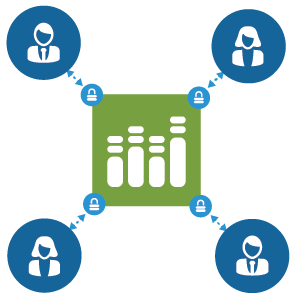
LabKey Server for secure reporting and collaboration in clinical researchSecure Reporting and Collaboration

A key component of effective clinical data management is the ability to share reports and data with collaborators to improve research, innovation, and ultimately patient care. Maintaining compliance and having the ability to quickly share data and reports is an important topic to tackle in clinical research where patient safety and care is the top priority.

LabKey Server improves reporting and collaboration by providing:

  • Dynamic and static reporting tables and visualizations that can be shared as-needed
  • Web-based access to a central platform for data sharing
  • The ability to remove PHI fields or provide randomized IDs when sharing information with collaborators

With the right tools for clinical data management, research teams can eliminate data integration bottle necks and curate reliable datasets for analysis. Explore our example Longitudinal Study or Sign-up for a free trial to see how LabKey Server can help your team overcome these, and other common clinical research challenges.

Related Documentation

Read more about the features highlighted above on the LabKey Support Portal:

NIH Data Management & Sharing Policy

The biologics development process is a data-driven endeavor. A vast amount of data is generated from many teams with the hopes of answering questions and informing decision-making along the way. Centralizing this data and their analyses across experiments amplifies the power and impact that data has on biologics research and development. 

Of course, centralizing biologics assay data means much more than simply storing data in the same place. Data centralization increases the value of biologics data beyond one particular experiment or result by defining data relationships. The ability to aggregate data across multiple samples, assays, and experiments, with metadata describing the relationship of all of these to each other, is where modern data science resides. Whereas the analysis of a single value from a single assay shows a distribution, joining that assay with others reveals a richer data landscape that is ripe for analysis. These data landscapes yield even more insights when they are related to one another across many controlled variables and conditions.

Below are more ways that implementing tools and strategies for data centralization can impact the speed and efficiency of biotherapeutic development. 

Data Integrity 

Having a single source of truth for data makes it easier for organizations to track how (and by whom) data is generated, accessed, and modified. With the assistance of a biologics data management application serving as a central hub-  permissions, auditing, and backups provide control over how, when, where, and by whom data is used. Centralization of data also encourages standardization of data formats across research teams. Standardizing data structures helps validate the data being entered and helps preserve the relationships between data. This leads to downstream efficiency and maximizes the utility of experiments beyond the individual or team from which it was derived. 

Collaboration 

Centralizing biologics research data also helps promote collaboration between research teams. By storing data in one central location in standardized formats, scientists can easily find, compare and reference existing data in their research. A central repository for data also makes it much easier to see what data is missing or needed to inform decisions. Hand-offs of data are also made easier when all data is centrally stored. 

About our Biologics LIMS

LabKey Biologics provides researchers with a set of tools to centralize biological entity registration, workflow management, and data exploration. 

  • Bioregistry – Register and track molecular entities, nucleotide sequences, protein sequences, expression systems, constructs, vectors, and cell lines
  • Biologics Assay Management – Connect design data to related multi-dimensional assay results for a complete data landscape.
  • Biologics Workflow Manager – Centrally manage biologics development workflows to help your team collaborate
  • Electronic Lab Notebook – Highlight and connect your research entities and data with our biologics ELN

Click Here to take a tour of LabKey Biologics.

Evaluating an SDMS for Life Science Research

For life science organizations, evaluating and selecting a data management system is a critical process that can have a lasting impact on their research. Research data is among the most valuable assets that an organization possesses due to the enormous amount of time, effort, and resources spent in its collection and analysis. Whether from lab instruments, a clinical trial or an observational study, data is central to decision-making, and ultimately to scientific discovery. 

When evaluating data management systems, focus on scalability and flexibility.

Efficiently managing research data requires a data management system that is specifically tailored to the ever-changing needs of scientific research. Planning for the future needs of your organization is essential when choosing a data management system. Research organizations may need to plan for:

  • Expanding their lab, research team or collaborators
  • Shifting into new experiments, instruments, assays, therapeutic areas or types of data
  • Dealing with exponential growth in the volume of data being captured
  • Experiencing increased needs for compliance, security, privacy, data sharing, provenance tracking, reproducibility

The data management system you choose should be able to handle any of the scenarios above. By focusing on your future needs you can avoid being locked into a system that will not grow and adapt to new requirements. Under this guiding principle, Our recent webinar outlined six areas that are critical to choosing the right data management system for your organization.


When evaluating a data management system look for:

  1. Robust security and compliance controls
    The first requirement for any data management system is that it meets the security and compliance needs of your organization and area of research. Without meeting these requirements the system will likely hit internal roadblocks and may be deemed insufficient for your organization and use case.
  2. Ability to handle large volumes of diverse data
    Your data management system should be designed to efficiently bring together and integrate large volumes (millions of rows, hundreds of columns) of diverse data. A clinical trial may include demographics data, sample data, instrument data, and clinical data. Your system should be able to centralize and align all of these data types for efficient and accurate analysis.
  3. Support for automated, high throughput data acquisition
    Large volumes of data necessitate automation for scalable and efficient workflows. However, data files are often imperfect and automating their import requires robust quality control functions to ensure the accuracy and integrity of data within the system.
  4. Integration of disparate data and metadata
    Beyond acquiring large volumes of data using automation, the system must integrate and annotate data in scientifically relevant ways. For example, a clinical trial may need to align sample, assay, and clinical data via participants and visits. By using clinical ontologies, your system should be able to harmonize your data in meaningful ways.
  5. Support for data analytics systems
    When deciding what system support is required for analytic tools, it is imperative that you include your research team and the larger organization. The system you choose should support a wide diversity of analytic tools. This includes both native tools within the system as well as third-party analysis software.
  6. Actively developed and supported by the vendor
    Choosing a system that is actively being developed and supported by the vendor is key to the ability of the system to grow and adapt to the changing needs of your organization. Like scientific research, technology is consistently evolving and your vendor should be dedicated to the success of your organization and research goals.

Watch the webinar below to learn more:[vc_video link=”https://youtu.be/jIubcWkiPwo” align=”center”]

What’s New in LabKey 22.7!

LabKey Server

  • The Text Choice data type provides an easy way to define a set of expected text values for a field. (docs)
  • Sample naming patterns are validated during sample type definition. Example names are visible to users creating new samples. (docs)
  • Queries can be included in published studies. (docs)
  •  Ontology insert and update forms now support type ahead filtering for quick input into ontology lookup fields. (docs)

Sample Manager

  •  Sample Finder: Find samples based on source and parent properties, giving users the flexibility to locate samples based on relationships and lineage details. (docs)
  •  New Storage Editor and Storage Designer roles, allowing admins to assign different users the ability to manage freezer storage and manage sample and assay definitions. (docs)
  •  Redesigned main dashboard featuring storage information and prioritizing what users use most. (docs)

Biologics

  •  ELN Improvements:
    • Notebook entry locking and protection: Users are notified if someone else is already editing a notebook entry and prevented from accidentally overwriting their work.
    • Find notebooks easily based on a variety of filtering criteria. (docs)
  • Freezer Management for Biologics: Create a virtual match of your physical storage system, and then track sample locations, availability, freezer capacities, and more. (docs)
  •  User-defined barcodes can also be included in sample definitions and search-by-barcode results. (docs)

Premium Resources

See the full Release Notes 22.3 (March 2022)

Integrating Benchling Data in LabKey at Inzen Therapeutics

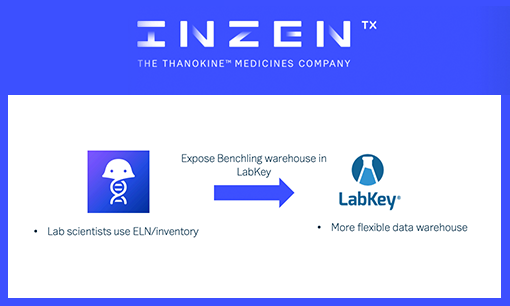
At Inzen Therapeutics, the data science team uses LabKey Server as a one-stop-shop for data warehousing. Their goal is to help bench scientists quickly answer questions about their data. Through LabKey’s API, Inzen can access previous experiments and run downstream analyses on proteomics and phenotypic assay data. This enables Inzen to better understand the intercellular signals sent during execution of cell death programs, which they have termed “thanokine biology.”

Integrating Benchling Data with the LabKey API

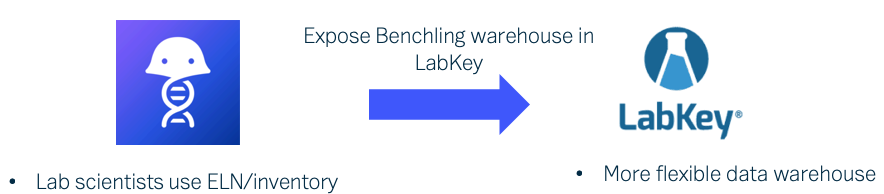
Lab scientists at Inzen use Benchling, a suite of tools used for notebook management, molecular biology, and inventory tracking. It includes its own data warehouse, which contained the sample metadata. However, data scientists at Inzen use LabKey Server for other lab data management functions including storage of all omics data, metadata on measurements, hit lists from previous experiments and curated annotation sets. To help their scientists, Inzen knew they would have to integrate the Benchling data warehouse with LabKey to establish a single source of truth and develop core analytical pipelines. 

Watch the video below to learn how the data science team at Inzen integrated disparate data streams from Benchling and LabKey using the unified LabKey API.

Want to learn more? Request a Demo.

[vc_video link=”https://youtu.be/F4LfvSL4hAw”]

What’s New in LabKey 21.7

LabKey Server

  •  File Watchers – Use file watchers to automate the import of sample and assay data.
  •  Ontology Concept Picker – Improve data entry by guiding users to a specific part of the concept hierarchy.

Sample Manager

  •  Study/Sample Integration – Add samples to studies and associate them with specific participants and timepoints.
  •  Aliquots – Create aliquots of samples singly or in bulk.
  •  Picklists – Create and manage picklists of samples to simplify operations on groups of samples.
  •  Move Storage Units – Track movement of storage units within a freezer, or to another freezer.
  •  Barcode/UniqueID Fields – A new field type, “UniqueID”, generates values when samples are added to a Sample Type or when the barcode field is added to an existing sample type.

Biologics

  •  Electronic Lab Notebooks have been added to LabKey Biologics. Link directly to data in the registry and collaboratively author/review notebooks.
  •  Hide Sequence Fields – Nucleotide and Protein Sequence values can be hidden from users who otherwise have access to read data in the system.

Premium Resources Highlights

Click here to read the full 21.7 Release Notes