We asked lab managers… What do you love most about Sample Manager?

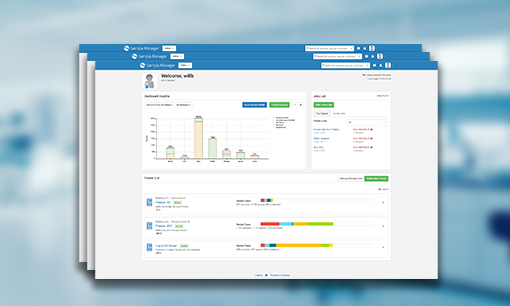
Sample Manager, sample management softwareIt’s no surprise that our users are overwhelmingly happy with the ease and efficiency that Sample Manager has brought to their labs. After all, Sample Manager was created in close consultation with labs of all shapes and sizes to ensure that we were creating the best sample management software on the market. We recently asked lab managers what they love most about Sample Manager and how it has impacted their labs. Their responses varied, but all shared a common theme- Sample Manager makes lab work easier and faster.   

“Sample Manager is so easy to use. It makes all of our days easier and more productive.”

With a beautifully simple user interface and intuitive features that are essential for modern laboratories, Sample Manager is designed to bring ease and efficiency to sample management tasks. From bulk importing and storing samples to tracking lab workflows and managing data, Sample Manager makes the management of lab samples faster and easier than ever before. 

“The Sample Timeline is amazing, I can finally see the complete history of a sample and who in the lab has touched it.”

Our Sample Timeline feature provides an audit-ready view of the complete history of each sample. By reviewing the chain-of-custody, you can easily see the “who, what, when and where” for each event in the timeline of a sample. Events may include sample registration, storage changes, sample check-in/check-out events, assay runs and more. The sample timeline can also be exported to Excel for further analysis and review.

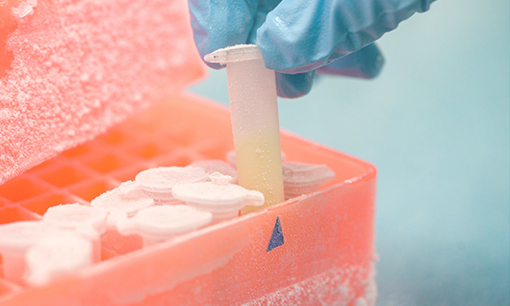
“No more searching for lost samples! The freezer management features alone have saved us so much time.”

Helping our users efficiently search their sample inventory and manage their freezer storage is a core function of Sample Manager. Our flexible freezer management tool allows you to create an exact match of your physical freezer storage options within the application. You can also use our Sample Finder tool to build custom queries to search, group and take action on related samples.

“The lineage tracking capability has been a gamechanger. We can now easily tie samples back to their sources and aliquots that have been created.“

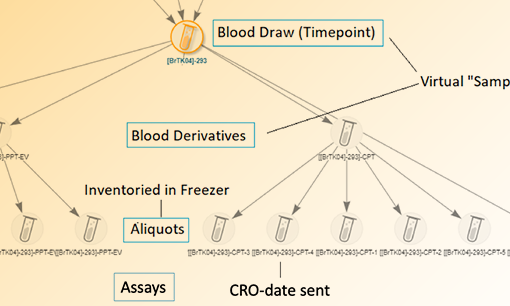
Tracking samples and their derivatives has been made as easy and intuitive as possible within Sample Manger. Using a visual lineage tree, users can easily see the context and details of samples including all sources and aliquots. We’ve also streamlined the creation of aliquots from samples to boost efficiency in the lab. 
Learn More About Sample Manager:

Clinical Sample Management – 4 Essential Questions for Better Tracking & Compliance in the Lab

Clinical sample management poses unique compliance challenges for laboratories. Sample collection, tracking and consent all become more regulated (GLP, GCLP, HIPAA) when managing clinical samples, and require a greater depth of record-keeping and reporting. Although keeping up with these regulations can seem like a daunting task, you can simplify and get a good start on improving regulatory compliance by focusing on 4 basic sample tracking questions: What? When? How? and Who?.

Clinical Sample Management

Lab staff should be able to answer these questions for every clinical sample managed in the lab. In order to do this, your lab will need to capture all details around the collection, receipt, storage, processing and handling of samples. With each sample requiring the capture of so many data points, it is essential to have modern sample management software designed to support the management of clinical samples.

What? – Fully and accurately define your samples, sample types and sources.
Document the type(s) of samples you will receive/create including the descriptive metadata that you want to collect for each sample type. Make sure to consider the source of the sample (perhaps a clinical trial participant), derivatives, and any other related details you need to capture. 

When? – Track dates for everything related to your samples.
Capture dates for all events in the lifecycle of a sample including when it was collected, received, processed, stored, and shipped. This data should be readily available and exportable for further analysis during an audit.

How? – Capture everything that has been done to your samples in detail.
Track step-by-step how tasks were performed in the lab in relation to a sample. This includes all of the steps taken during sample receipt, checking of tubes for breakages or possible contamination and documenting storage conditions. Utilize a sample management system to capture SOPs in lab workflows and audit trails.

Who? – Capture who has worked with your samples.
Capture who in the lab performed any work or handling of the samples. This is both valuable for accountability and troubleshooting in the lab as well as for supplying auditors with additional information that they may need.

Clinical Sample Management with LabKey Sample Manager

Clinical Sample Management and TrackingEfficient and compliant management of clinical samples requires sample management software that is both powerful and easy to use. Sample Manager is a cloud-based sample management system that helps:

  • Track the full history and chain of custody for each sample.
  • Register and define samples using all relevant metadata 
  • Manage task-based workflows that accurately reflect SOPs
  • Support barcoding and unique, human-readable sample ID creation
  • Easily manage freezers and sample storage 

Click here to learn about Sample Manager and take a product tour!

Biomarker Sample Management at Candel Therapeutics

Candel Therapeutics is using LabKey Sample Manager to manage biomarker samples from the clinical sites where they’ve been collected all the way to the externally performed assays.

At the LabKey User Conference, Jessica Dwyer, Biomarker Operations Manager at Candel Therapeutics, shared how her organization is using LabKey Sample Manager for biomarker sample management. Her presentation covers the process of selecting a sample management software, reasons for choosing sample manager, and how Candel is now using the application. 

Candel is an oncolytic viral therapy company producing therapies to target solid tumors. Their approach to immunotherapy centers on oncolytic viruses that induce immunogenic cell death at the site of injection which then unmasks tumor neoantigens. This process has been shown to create a systemic immune response against tumors with evidence of clinical and biomarker activity demonstrated across several solid tumors. The feasibility and tolerability of this approach has been demonstrated in over 700 patients across multiple phases of trials.

Prior to LabKey Sample Manager, biomarker samples from clinical trials were being tracked using excel
spreadsheets. The drawbacks of managing biomarker samples in this way included:

  • Time wasted searching for the latest versions and interpreting data
  • Lack of audit trail and consistency of data between studies
  • Ineffiecient processes for registering and tracking samples

Candel Therapeutics evaluated three different biomarker sample management solutions including Sample Manager. They were looking for software that provided a complete and searchable audit trail, required minimal implementation time and had features that met their needs without work-arounds. After evaluating the options, LabKey Sample Manager was chosen as the solution that most closely matched these requirements. Sample Manager was chosen due to:

  • LabKey’s specialization in the management of clinical trial samples
  • Aliquot features
  • Sample relationship features (data from sample types and sources can be tracked)
  • General ease-of-use 

Watch the video below to learn more about how Candel Therapeutics is using LabKey Sample Manager.

Want to learn more? Request a demo of LabKey Sample Manager!

[vc_video link=”https://youtu.be/YH1ys6VdNdQ”]

Scientific Collaboration with LabKey Sample Manager

Many researchers are continuously seeking ways to boost scientific collaboration. As with other disciplines, enabling scientific collaboration requires the right tools and processes. This is especially true when researchers are sharing samples that need to be tracked at each step of their lifecycle. For some labs, collaborative sample tracking involves a piecemeal approach of emails, spreadsheets, and whiteboards to give teams some visibility into the next steps, assigned work and upcoming projects. This method of sample tracking is highly prone to error and can easily get unwieldy as a lab grows or the complexity of sample processing increases. 

Finding a sample management software that tracks samples throughout their life cycle while also enabling scientific collaboration is imperative for the modern laboratory. Sample Manager has been designed by scientists, for scientists, to help get work done in the lab. We have created a tool that integrates sample registration, storage, experimental data and work assignment for doing all your sample-related work in a single application. Below are a few features that help enable scientific collaboration in the lab.

Workflow Management for Scientific Collaboration

Our task-based lab workflow management tool allows teams to capture the exact work that needs to be performed on samples. Using customizable templates, labs can easily standardize processes and create workflows that accurately reflect their SOPs. Common lab processes like sample receipt, shipping preparation, processing, and assay requests can all be managed using the Sample Manager workflow tool. For each workflow, samples are selected for inclusion in the job, tasks are assigned to individual team members, and notifications communicating the status are sent. The ability to set due dates and the priority of the work allows teams to plan and prioritize work appropriately. 

Freezer Management/Sample Location Tracking

Our sample-centric freezer management tool gives teams insight into freezer capacity and the physical storage of samples. Team members efficiently work in an intuitively designed virtual freezer environment, capturing notes for freeze/thaws and displaying those in the Sample Timeline. Users can quickly understand storage capacity, relative sample breakdown, and overall sample status across storage units in the lab.

Picklists

Teams can create private or public Picklists of samples to generate pull lists, manifests or any other type of list that would be useful for tracking and sharing samples. Sharing picklists with team members enables visibility into user-curated lists of samples and reduces the need for exporting, printing and emailing lists of samples to team members. Shared Picklists can be used to print labels, check samples in and out storage, and add samples to workflow jobs. 

Click here to learn more about Sample Manager and take a tour!

Benefits of Sample-centric Freezer Management Software

Most freezer management software aims to be a mirror image of a lab’s freezer space. Samples are assigned location in the freezer at the same time as they are entered into the system, and removed from the system when they are no longer in storage. Although this may be helpful in managing freezer capacity and sample locations, this “mirror image” approach does not always accurately reflect lab workflows or provide a full chain of custody of a given sample. 

In many labs, samples are transported, received, and processed before they are stored. Similarly, samples can also be completely removed from storage, but their data and audit logs may need to persist in the system. The freezer management software described above would be ill-suited to handle both of these scenarios. To fully track a sample and provide an end-to-end history, teams should search for a sample-centric freezer management tool- one that separates a sample’s existence from the physical location in which it’s stored.

A sample-centric freezer management software has the following benefits:

1. Samples can exist outside of a storage framework. This means that teams can:

  • Save time and improve visibility of work by registering samples before they arrive
  • Easily view consumed, expired or shipped samples without crawling an audit log
  • Track chain-of-custody of samples that are never meant for storage

2. Samples can be part of lab tasks before or after they are physically stored. This is useful in cases like:

  • Pre-registered samples are part of a “Receiving” workflow job
  • Sample processing can be tracked in the system before adding the samples to storage
  • Outgoing samples can be tracked in a workflow job

3. Experimental data can be associated with samples at any time. This benefits teams by:

  • Adding associated data from external sources to be registered with samples, regardless of storage status
  • Removing the need for “staging” freezer space to make updates to samples and their experimental data
  • Creating a single space for tracking samples and their associated data, whenever it is available

About LabKey Sample Manager

LabKey Sample Manager includes a sample-centric freezer management solution into the application. This means you can create samples, add metadata and lineage information, perform work and even upload assay data — all without being required to have your sample in freezer storage. Freezer management in Sample Manager can help you:

  • Manage your freezer with an end-to-end sample tracking system that stores the entire sample history and chain of custody in one place
  • Organize your samples using a customizable structure that accurately reflects the physical freezers in your lab
  • Track samples in and out of the freezer (freeze/thaw counts) and automatically calculate and track changes in sample volumes
  • Easily find samples in the freezer and move samples between freezers
  • Tracking and maintaining full audit logs of the freezer and of the samples

Picking the Right Sample Management System for Your Lab

Sample Management SystemFor many labs, choosing a new sample management system can feel like a daunting task. Whether it’s your first time using software to manage your samples, or you are looking for a new sample management system to replace an existing application, there are a few considerations to keep in mind.

Sample Management System Features

When evaluating a system to manage your samples, it is important not to think about whether “it’s the right system”, but rather if it is “the right system for our laboratory’s needs right now and in the future”. 

Think about the features the system offers and how it matches up with your lab processes and workflow. Are the structured that you would have to change your existing lab processes? Do you feel that you require a system with more flexibility so that it can be configured to your existing sample management processes? Beyond your current lab operations it is also important to consider the future of your lab – do you plan to introduce new assays, processes, or sample tracking procedures, and will the system be able to handle those? Do you need freezer management features to help manage sample storage?

Aside from features, you should also think about how much effort it will take for your team to implement and configure the new system. 

Sample Management System Pricing

The price of the sample management system is also an important consideration. Make sure you are aware of the factors that determine system pricing. This may include pricing tiers based on the database size, number of users, number of samples, availability of certain features, or other price-determining factors. Make sure you are comfortable with any potential increase in cost as your lab grows and your needs change. This can help prevent an unexpected and significant increase in cost at a certain capacity. Making an effort to estimate usage, including users and amounts of data, prior to choosing a system will help you be a more informed buyer and help plan for the future. 

Adopting a Sample Management System in the Lab

Once you feel comfortable with the feature set and cost offered by a particular solution, the single-most important factor in implementing the software is gaining adoption within the lab. 

Incorporating a new sample management system into the lab can be arduous and challenging. Scientists are used to working in a way that is most efficient for them, and introducing a new system may be disruptive to their normal way of operating. To minimize this disruption and foster adoption of the new system, make sure to include the end-users in the lab during the evaluation process. Allow them to test their scenarios and evaluate usability. Create an environment where their feedback is valued and taken into consideration, and ideally choose a system that helps boost their efficiency and complement existing processes. Choosing software that provides tools for data validation, integration and reporting are all good ways to help scientific efficiency move in the right direction. 

Once you have chosen a sample management system, determine an implementation plan that will work for the group, and allow for some trial and error. Pick one or two lab processes that can be moved to the new system, gather feedback and make improvements as needed before implementing a new set of processes. Have a concrete timeline that will empower users to fully test the system and provide time for feedback and checkpoints. 

Product Highlight: LabKey Sample Manager

LabKey Sample Manager is a feature-rich and intuitive sample management software designed to boost the efficiency and productivity of your lab. Easily track samples, manage their lineage, define laboratory workflows, and unify your samples with assay data. Learn more about Sample Manager using the links below:

Sample Tracking – End-to-end sample tracking features including chain-of-custody tracking,  sample types and sources, and lineage views

Lab Workflow Management – Use workflows to standardize lab processes and manage ongoing work in the lab

Freezer Management – Manage sample storage and freezer capacity using an intuitive interface

Sample Data Integration – Integrate assay data with your samples and assign metadata for a complete picture of your ongoing experiments 

Explore Sample Manager – Sign-up for a tour ofLabKey Sample Manager!

LabKey launches Sample Manager – sample management software with data integration and workflow features.

LabKey Sample ManagerLabKey has released Sample Manager, intuitive and powerful sample management software that brings greater ease, efficiency and insight to sample processing within laboratories. The application’s easy-to-use interface provides access to a host of powerful features that address common challenges experienced by labs in the processing and management of samples. These features include user-friendly mechanisms to create samples and efficiently discern sample lineage, workflow features to easily assign and track sample processing tasks,
and features to unify samples with their related experiment data. 

Sample Manager was built with valuable insight from a Product Advisory Council (PAC) made up of academic and biotech laboratories conducting research in various fields. PAC participants focused on providing LabKey with input that informed the development of features to boost sample processing efficiency, provide greater operational control and promote data integrity. 

Read the full press release about the Sample Manager launch by clicking here.

Try LabKey Sample Manager

You can easily begin exploring Sample Manager by visiting the product page and clicking the “Get Access” button in the green section. Once you fill out the form, you will receive an access link in your email to a read-only evaluation version of Sample Manager. Additionally, we will be hosting an “Introduction to Sample Manager” webinar on February 20th at 10:30am PST. Product manager Hannah Brakke will give an overview of the application and conduct a live demo of key features. 

To register for the webinar, please click here.

4 Tips for Improving Lab Sample Management Workflows

Research and clinical laboratories alike are continuously striving to improve their lab sample management workflows. As more organizations invest in translational and collaborative research, the need to collect samples with higher integrity and reproducibility increases. By using sample management software to improve their laboratory workflows, labs can generate more reproducible and reliable endpoints while also boosting processing efficiency. Standardizing processes and workflows can help improve identification methods and reduce processing errors within laboratories. 

Common ways to improve your lab sample management workflows include:

  1. Standardize the processes within your lab.
    Developing Standard Operating Procedures (SOPs) for your laboratory sample management increases the reliability of endpoint samples and therefore the assay results. Well-developed SOPs will account for common troubleshooting methods and provide mechanisms for users to document abnormalities. This in turn will provide more insight to groups downstream about the sample fidelity. SOPs also act as excellent training resources for new staff and ensure the entire team is well trained and prepared for managing samples in the lab.

  2. Determine your laboratory capacity.
    Establishing capacity for any workflow is important. Determining the capacity of both your laboratory staff as well as equipment capacity is important to establish limits that will guide the most effective and reliable lab sample management workflow. By evaluating the available capacity of staff and equipment, new insights can be learned to improve lab and sample processing efficiency.
     
  3. Automate where possible. By introducing automation methods, even if they are as straightforward as barcode generation and scanning, you can improve the laboratory capacity as well as reduce the potential for errors. Barcodes in particular will enhance sample identification and minimize additional effort from laboratory staff. Other advanced methods of automation, such as robotic processing, may also provide value but are typically more costly and can increase processing time in some cases.
  4. Deploy integrated systems that help laboratory work. Using software systems in the lab that do not hinder sample management processes, but instead enhance them, is important for gaining adoption and boosting laboratory morale. By having integrated systems that are easy-to-use, researchers can perform work faster with less ramp-up time, and can recognize discrepancies easier. Downstream, integrated systems offer organization leadership the mechanisms to track workflow data over time with the ability to easily adjust workflows to improve processing.

LabKey Sample Manager

Developed in coordination with our lab partners, LabKey Sample Manager has been intuitively designed to boost the efficiency and productivity of laboratories. The application allows for the registration and tracking of samples and their derivatives, as well as the assignment of samples to custom sample processing workflow jobs. This provides a flexible yet standard mechanism of capturing tasks in each workflow, and can act as a virtual record of sample processing. Additionally, Sample Manager allows laboratory staff to easily capture data generated from these workflows and associate them with samples. 

Contact Us for more information regarding Sample Manager.

Related Post: Benefits of Unifying Lab Samples with Assay Data

Benefits of Unifying Lab Samples with Assay Data

Many laboratories experience challenges with their sample data management functions. Samples, aliquots of samples, and the data derived from them are often stored as a mixture of paper and electronic records, or in hard-to-search electronic laboratory notebooks. Difficulty in managing complex interlinkages and the inability to tie results data back to sample records can cause duplicate assays to be performed and puts data integrity at risk. Having a system that unifies assay data directly with sample information provides bench scientists, lab managers and investigators with a comprehensive view of the work that has been, or needs to be performed in the lab. It also provides downstream researchers with valuable information on how and when results were derived for each sample.

By unifying your lab samples with assay data, you can:

  1. Analyze, interpret and report the data more accurately. With an understanding of how samples were generated and pre-processed, scientists can ensure their downstream data analysis takes these sample metadata into account when they perform their analysis. This improved reproducibility in the lab and generates publication-ready data.
  2. Easily attain accurate insight into what data has been collected around a given sample, avoiding the time consuming process of searching through lab notebooks or loose data files. Knowing what data has been generated will reduce duplicative experiments, increase productivity and ultimately result in less overhead expenses.
  3. Generate data provenance between data that is created from samples, allowing users and auditors to easily understand how data was generated.

LabKey Sample Manager 

Developed in coordination with our lab partners, LabKey Sample Manager has been intuitively designed to boost the efficiency and productivity of laboratories. The application allows for the integration of various types of tabular assay data with samples and their corresponding metadata. This provides a complete picture of ongoing experiments and data collected. Additionally, Sample Manager allows laboratory staff to easily capture sample lineage and assign samples to customizable laboratory workflows.

Contact Us for more information regarding Sample Manager.