How-To’s of Managing Flow Cytometry Data


Flow cytometry data is widely used across diverse set of research areas including drug discovery and personalized medicine. Ongoing improvements to instrument technology allow scientists to generate more and more targeted reagents which in turn leads to increasing amounts of high-dimensional flow cytometry data. As the application of flow cytometry in immune monitoring becomes more prevalent, many scientists are finding themselves asking “what is the best way to manage flow cytometry data?”

As teams evaluate software tools for managing flow cytometry data, there are several things to keep in mind. Instrument-generated fcs files from cytometers are generally not useful to scientists on their own. Typically, users interrogate their data by creating an analysis file, either with manual gating through commercially-available tools like FlowJo and FCS Express, or by performing computational analyses via free software packages like Bioconductor. Ensuring that data provenance is maintained between fcs files and analysis is vital, and provides valuable information for groups looking to validate or re-analyze the raw data in the future.


Best practices for maintaining comprehensive flow cytometry records using LabKey ServerMaintaining Comprehensive Data Records

The LabKey Server software platform help groups ensure data provenance and maintain comprehensive flow cytometry records by:

  • Allowing for import of raw fcs files as well as analysis files
  • Validating all fcs files are present when linking data to a FlowJo workspace file
  • Auditing file upload for analysis data used in a LabKey study
  • Surfacing run parameters and compensation values for further quality control

Add value to flow cytometry analysis runs using LabKey Server

Adding Value to Runs

LabKey Server’s flow cytometry tools can also helps add value to runs by:

  • Providing mechanisms to insert keywords and adding metadata
  • Ensuring gate naming is consistent across workspaces
  • Allowing administrators to merge gating strategies when necessary
  • Visualizing statistics in Levy-Jennings plots for valuable quality control metrics


Using LabKey Server visualization tools to interrogate flow cytometry analyses

Improving Data Analysis Workflows

Using LabKey Server, scientists can achieve further improvements to their analysis workflow by:

  • Integrating flow cytometry statistics and 2D plotting within the LabKey Server platform
  • Creating easy integration mechanisms across flow cytometry runs, panels, and projects
  • Providing built-in visualization tools for users to interrogate their data

With the right tools, scientists can maximize the insight derived from their flow cytometry data. To learn more about using LabKey Server to manage flow cytometry analysis, check out the flow cytometry documentation library or request a demo.

LabKey Then & Now: GeekWire Highlights LabKey’s Evolution

Long-time partners of LabKey know our story well; born out of Fred Hutch, the LabKey platform was developed to help research teams make sense of the large volumes of research data being generated by high-throughput proteomics analysis techniques.

While our mission is still the same, the platform has greatly expanded over the last 13 years to support new data types, analysis methods, and research disciplines from rare disease investigation to large-molecule drug development. In their recent article, GeekWire highlights LabKey’s evolution from a 3-person team in a Fred Hutch office to the self-sustaining solutions provider we are today.

LabKey’s motivation hasn’t changed a bit. “Every one of our customers you would want to be wildly successful,” said [LabKey CEO,] Michael Gersch. “Because they’re helping humanity. That’s what’s so neat about what we get to do.”

Read the full article on GeekWire.com to learn more about the history of LabKey and our vision for what’s next.

Original Article
Thorne, James. “How Fred Hutch spinout LabKey bootstrapped its way to compete in health care’s big data.” GeekWire, December 28, 2018, https://www.geekwire.com/2018/fred-hutch-spinout-labkey-bootstrapped-way-compete-health-cares-big-data/

What’s New in LabKey Biologics

Over the past few months, the LabKey team has made several key enhancements to the LabKey Biologics application to help teams organize and visualize data relationships. Take a look at some of these recent enhancement below.

Group Sample and Assay Data Using the Biologics Experiment Framework

An experiment framework has been added to LabKey Biologics that allows users to group all the data relevant to a single experiment. Teams can define a name and description for each experiment, add samples, and upload analytical results.

Navigate Between Generations of Samples with the New Lineage Grid View

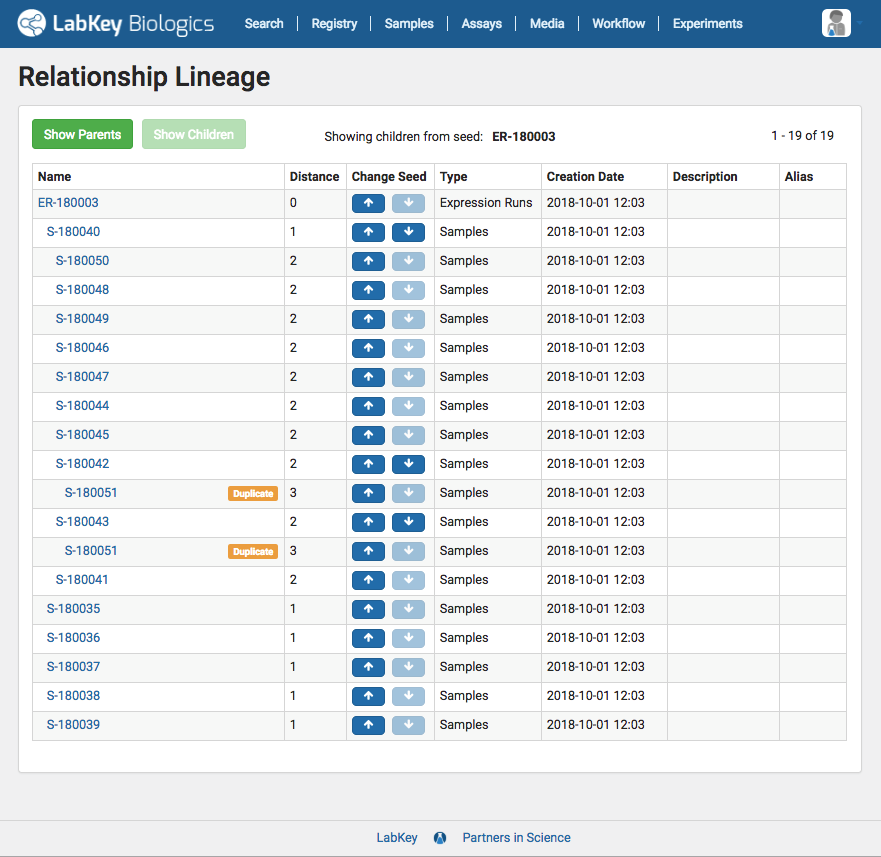
In addition to the existing lineage visualizations, LabKey Biologics users can now view all of the ancestors and descendants of a particular sample in an easy to navigate lineage grid. This grid view is particularly helpful when viewing lineage data for samples with large quantities of related samples or lengthy derivation history.

Auto-Register Sequences During GenBank File Import

Improvements to LabKey Biologics import process enable to the auto-registration of multiple sequences when a GenBank file is uploaded. With these changes the full sequence of the plasmid, the coding sequences, and the resultant protein sequences are now auto-registered.

Want to see these features in action

Explore LabKey Biologics free for 30-days in our hosted trial environment, or contact us to request a demo.

Data-Driven Tools for Optimizing Cell Culture Media

Cell culture is a central component of protein development and the media used during this process can have a significant impact on its performance. In the R&D environment, media technicians are responsible for both the precise production of cell culture media and the optimization of media recipes to maximize qualities such as growth and stability.

Capturing the detailed information about recipes, ingredients, and batches needed to optimize media production is one of the key challenges faced within protein engineering. The advances in cell culture technologies in recent years have quickly outpaced simple spreadsheet and database-based systems for storing media recipes and batch IDs. Today’s media technicians need software tools to consistently structure data about media recipes, ingredients and batches, so it can be easily accessed and queried on demand.

LabKey Biologics provides essential tools to help protein engineering teams overcome key challenges in cell culture media development, including:

Capture the steps, ingredients, concentrations, and other details of cell culture media recipes in the LabKey Biologics software

Detailed Recipe Registration

Registering a recipe in LabKey Biologics allows technicians to specify all of the information needed for its execution including ingredients, ingredient concentrations, steps for creating the mixture, expiration time, and other key aspects. The system also allows the creation of mixtures that contain other mixtures, even when you don’t know all of their underlying concentrations or ingredients (as is often the case with vendor-supplied mixtures).

Media technicians have a number of different methods available for registering media recipes, depending on their complexity and scale. Technicians can create recipes individually using the media registration UI or they can register many recipes at once using bulk upload features or programmatic registration via LabKey Biologics API.

Software tools for creating consistent cell culture media batches.Consistent Batch Preparation

LabKey Biologics helps minimize formulation errors by auto-calculating the amounts for each ingredient in a recipe based on a target mixture amount. As a technician prepares a batch of mixture, they are prompted to input the actual amount of each ingredient used, as well as the raw material ID. If the media technician needs to use multiple bottles of a raw ingredient to fulfill the formulation, the system will allow them to register multiple raw materials for a single ingredients.

Data driven cell culture media optimization using LabKey Biologics softwareFollowing the Media Trail

The structured data captured in LabKey Biologics allows R&D teams to track the complete lineage of each individual sample, and present lineage as a visualization or grid. Sample characteristics, assay results, and relevant media details are tied together allowing media technicians to troubleshoot problematic raw materials, better optimize their batches, and improve upon media recipes to improve protein yield.

With the right tools, cell culture media technicians can consistently produce media batches and iterate media recipes to maximize performance. Request a demo to see this functionality in action and learn more about how LabKey Biologics can help accelerate your biotherapeutic R&D.

LabKey Biologics for Protein Engineers

LabKey Biologics registration and classification tools for protein engineersThe focus of pharmaceutical and biotech research has seen a significant shift in recent years. Many research teams are no longer driving towards building small molecules, but are instead focused on designing new protein-based therapeutics. Protein engineers at these organizations are often responsible for the structural design of target molecules as well as the experimental protein production and characterization of their designs.

To support this work, protein engineers need biologics software tools to capture details about molecular components such as proteins, antibodies, plasmids and cell lines, as well as the detailed steps of the development process. LabKey Biologics provides an easy to use system for centralizing this information and additional tools to help facilitate protein design including:

Uniqueness Verification

There are a number of entities that might be critical for a research organization to register in a bioregistry. These could include:

  • Protein Sequences
  • Nucleotide Sequences
  • Molecules (ex: Antibodies)
  • Plasmids
  • Cell Lines

Each of these entities is checked for uniqueness when they are registered in LabKey Biologics.  This prevents dirty data caused by duplicate records and reduces duplicate work for protein engineers. Uniqueness checks are in place for all entity types, whether you are registering a single sequence or a molecule composed of multiple protein sequences.

Uniqueness checks are also run on data auto-registered during the import of a GenBank file. In that case, LabKey Biologics will register plasmids during the import of a GenBank file, but also auto-register any regions that translate to protein sequences. If a protein sequence already exists, the system will register only the relationship between the plasmid and that protein sequence, not create a new sequence.

Classification by Protein Engineers

LabKey Biologics includes a classification engine that can identify, predict, and calculate various characteristics of registered molecules. This saves protein engineers valuable time manually assigning classifications.

The system automatically detects many regions and features of protein sequences including leader sequences, variable regions, constant regions, and CDRs. LabKey Biologics can also be trained to recognize additional sequence classifications, for example, by registering a leader sequences as a “Leader” within the system, it will recognize future leader sequences that match it.

LabKey Biologics can also recognize heavy chains and light chains and predict their type,  based on the amino acid sequence of a registered protein, as well as the isotype of the overall antibody.

For all of these classifications, whether LabKey Biologics is detecting subsequences on the amino acid sequence or the type of overall sequences, the protein engineer can always override the classification engine if the prediction is incorrect.

Integration with Other Systems

Often times, protein engineers are using another application to design proteins or plasmids. LabKey Biologics makes it easy to bring this data into the system, either via APIs or by bulk upload. Regardless of the registration method, the same classification and uniqueness checking features apply to all registered entities.

To see this functionality in action, request a demo! To learn more about LabKey Biologics check out our documentation and resources on the LabKey Support Portal.

The Power of Structured Data: Customizing Grid Views in LabKey Biologics

When analyzing biologics assay data, scientists often need to look beyond the results at related data to answer their research questions. Comparing lineage characteristics like which expression system was used to generate an experiment sample or details about the sample itself, such as the buffer used in it, can uncover crucial data patterns and insights.

This type of data exploration requires data to be captured in a structured manner and integrated into a central system where it can be easily accessed, queried, and analyzed.

Structuring Data for Maximum Value

LabKey Biologics provides tools to ensure that data is correctly structured and consistently stored. For each data type within the LabKey Biologics application, users are able to configure a specific structure, indicating the names of fields as well as their type. Because this data is consistently structured, a user can pull together relevant data from different sources for an integrated view of their data during analysis.

Integrating structured assay and sample data in LabKey Biologics using Sample IDs and look-ups.

For example, when looking at the results for a specific assay type, such as optical density, a user can add details about the samples themselves to the assay results data grid. This might include the buffer used, the expression system used to create it, or the name of the antibody (or other molecule) that was being produced.

Customized Data Views for Quicker Access

Users can customize the default assay data grid view to include these additional look-up columns. Customized default views provide quick access to all the data relevant to the user’s research, instead of having to join data each time they view the dataset. Users can also sort, filter, and search the data in these additional columns the same way they can with native assay data fields.[vc_cta h2=””]To see this functionality in action, request a demo! To learn more about LabKey Biologics check out our documentation and resources on the LabKey Support Portal. [/vc_cta]

3 Key Reasons Data Accessibility is Essential in Research

Modern research technologies have greatly increased the amount of scientific data being generated, but making full use of that data is still a major challenge. Data accessibility is a consideration at all stages of the research process; for bench scientists making data accessible to informaticians, for teams sharing data cross-departmentally, and for researchers making data accessible to the public.

The accessibility of data is essential for a number of reasons:

Data accessibility reduces duplication of experiments1. Minimizing Data Redundancy of Research Efforts

Research redundancy is a major problem within research organizations and across the research community. By making data accessible to their desired audience, researchers can reduce the number of redundant experiments conducted and instead iterate upon existing research to accelerate discovery.

Draw reliable conclusions from your experiment data2. Drawing More Reliable Conclusions from More Data

Broader data accessibility allows research teams to pool data and conduct analysis with greater confidence in their results. The more data a researcher has access to, the more statistical power they have to validate research conclusions and preempt questions of data quality.

Accessible data inspires novel approaches to answering scientific research questions.3. Inspiring Novel Questions from Different Approaches

New research questions are inspired by different research approaches and through the study of new methodology. Attacking scientific investigations from varying perspectives also helps reduce bias in analytics, experimental design, and conclusion drawing.

Expanding Data Accessibility with LabKey Server

LabKey Server not only helps teams collect and curate their data, but also helps make it accessible to collaborators and downstream researchers.

Web-Based Access

LabKey Server allows researchers to make their data accessible to a broad or narrow audience through a web-based portal. Web-based access makes it easy to share data as desired and allows interested collaborators to evaluate and alternatively analyze “self-serve” research data. This method of data sharing is both more secure than email (see fine grained permissions below) and much lower overhead than a standard institutional database as users can query, view, and export data without having to interface with a data scientist.

Fine-Grained Permissions

LabKey’s fine-grained permissions model makes secure, selective sharing of to data simple and reliable. With LabKey Server, teams can easily control who sees their data, restricting access to selected individuals or pre-defined groups, or making data accessible the general public. Researchers also have fine-grained control over what datasets are shared: either a single table of data or an entire research project.

Powerful Metadata

LabKey Server captures detailed metadata to help increase discoverability of research data and provide crucial context for other researchers who hope to explore, reanalyze, and/or expand upon it. Research teams can customize metadata captured for each of their data types and add organization specific metadata to support internal needs.

Interested in learning more about how LabKey Server can enhance the accessibility of your research data? Contact the LabKey team for more information or request a demo!

*To learn how configure accessibility features of LabKey Server, read documentation >

Two Key Things Your Spreadsheet-Based Research Data Management Strategy is Lacking

High-throughput analysis techniques are incredibly powerful and provide teams with more data than ever. While that depth of data often holds the key to scientific insights, organizing such large quantities of data in a consistent and discoverable way has become a major challenge for research teams.

Many teams rely on spreadsheet-based systems to organize and manage their data. This approach becomes less-effective as research scales because spreadsheet-based strategies lack two essential characteristics:

1. Consistency

Spreadsheet data management lacks consistencyManual file management relies on the individual contributor’s abilities to consistently create, name, and store data files. This opens the door to a wide range of human errors that will ultimately impact the discoverability and reliability of your data. Common consistency errors that result from manual data management include:

  • Poorly named files
  • Inconsistent locations
  • Duplicate files

2. Discoverability

Spreadsheet data management lacks discoverabilityCollecting data is a giant hurdle in research, but in reality, it is just the first of many. Researchers need to be able to locate datasets of interest in order to conduct analysis. In a file based environment, discoverability of files is dependent on the consistency with which they are maintained. Were they saved in the correct location? Have they been named according to an agreed upon convention? Is there a clear authoritative file or are there duplicates?

A hitch in any one of these areas can severely hinder the discoverability of your data and make it significantly more difficult to:

  • Track what research data has already been collected
  • Find the data you are looking for when it comes time to analyze

Biology-Aware Data Management with LabKey Server

Scientific data management systems like LabKey Server, help increase the consistency and discoverability of your research data. LabKey Server increases the consistency of data management by providing structured data grids for storing various type of research data. Each data grid type also captures relevant metadata, specific to that data type, in order to help make data more discoverable.

Research-Centric Data Structures

Unlike spreadsheets that treat all types of data the same, LabKey Server provides four primary data structures with unique features to better support common types of research data.*

LabKey Assays – Assay data grids capture data generated from individual experiment runs. Assay data is automatically structured in a batch-run-results hierarchy when data files are added. LabKey Server supports data a variety of common assay designs out of the box, but teams can also design their own assay data structure using LabKey’s General Purpose Assay Design.

LabKey Datasets – Datasets track patient/subject measurements over time. LabKey datasets are automatically aligned and joined together, making it easy to query the integrated data and to create visualizations from multiple datasets.

LabKey Specimens – Specimen repositories track the status of each specimen and vial in your inventory. Built-in reports provide a birds-eye view of specimen information, and advanced search capabilities allow for easy location of specimens.

LabKey Lists – LabKey lists provide general purpose, online, interactive grids for any tabular data. Data stored as a LabKey list can be sorted, filtered, and visualized using built-in tools.

Storing data in a consistent, structured manner is the key for teams that hope to achieve maximum efficiency in operations and maximum value from their data. Not only is it much simpler to find data when it is stored in an expected location, but the centralization and integration makes it possible to query data to more quickly locate information of interest.

Interested in learning more about how LabKey Server can increase consistency and discoverability of your research? Contact the LabKey team for more information or request a demo!

*To learn how to add data to LabKey Server, read documentation >

Genomics England and LabKey: Creating and securing “a dialogue between the clinical context and researchers.”

Genomics England 100,000 Genomes ProjectIn late 2015, Genomics England began working with LabKey to develop a LabKey Server-based data management and exploration portal that would facilitate the knowledge sharing dialogue between clinicians and researchers as part of the UK’s 100,000 Genomes Project.

The 100,000 Genomes Project, as characterized by Genomics England’s Chief Technology Officer, Jim Davies, is intended to promote “a dialogue between the clinical context and researchers.” This project, the largest national sequencing project of its kind in the world, will give both clinicians and researchers access to an unprecedented depth of data and information through the sequencing of 100,000 genomes from approximately 70,000 people including patients with a rare disease and their families, as well as patients with cancer. The mission of this dialogue is to ultimately bring benefit to patients and to enable new scientific discovery and medical insights in an ethical and transparent manner that will promote the development of a UK genomics industry.

The first phase of this collaboration centered around providing clinicians and researchers access to centralized phenotypic and sample information gathered from sites across the UK while ensuring security and privacy of patient information. The LabKey team focused development efforts during phase 1 on the aggregation, review, and integration of phenotype and genotype information from cancer and rare disease patient data.

This phase has provided:

  • Secure, extensible and reliable pipelines for data collection from 13 NHS Genomic Medicine Centres leading participant recruitment and partnering hospitals & clinics
  • Medical review workflow to assess data gathered of participants and families
  • Web portals for secure access of data
  • LabKey Server’s built-in reporting, querying, and visualization tools

LabKey and Genomics England are bringing the value of dialogue to the development process. LabKey is excited to continue its tradition of collaborating closely with its partners. With Genomics England, LabKey has developed a deep shared understanding of goals leading to a phased development roadmap of the LabKey Server platform. Close communication and collaboration will enable LabKey to flexibly accommodate new requirements and priority shifts to ensure a high-quality final product.

LabKey looks forward to the next phase of development of a “research” LabKey Server platform that will securely store and enable access to de-identified information that can be used by clinicians and researchers for advanced analysis. LabKey is proud to support Genomics England’s mission to promote a productive “dialogue” that will improve patient outcomes and scientific progress.

To learn more about the 100,000 Genomes Project, visit: https://www.genomicsengland.co.uk/the-100000-genomes-project/

Allen Institute for Cell Science Uses LabKey to Simplify Workflows and Accelerate Target Identification

LabKey partners at the Allen Institute for Cell Science are doing things a little differently. Launched in 2014 with a contribution from founder and philanthropist Paul G. Allen, the Institute was formed to integrate diverse technologies and approaches to study the cell as an integrated system. They are asking fundamental questions about cellular behavior to better understand healthy and pathological cells. Data and tools developed by the Institute are made publicly available to researchers around the world.

The Allen Institute for Cell Science team uses genome editing to add fluorescent markers to proteins in key cellular machinery and uses light microscopy to study the organization of that machinery and how it changes. During the generation of genome edited cell lines, they conduct quality control steps, including genotyping, stem cell marker analysis, karyotype testing, deep sequencing, and image-based assays. They also generate clonal lines for each gene and ensure that the cell line is useful for long term experiments. This work requires tracking cells, cell lines, genes, and all other quality control components through approximately 40 workflow steps.

The Allen Institute for Cell Science uses LabKey Server to capture metadata and assay data on each gene, cell, cell line, clone, and vector at each stage in the workflow: information that was previously housed in spreadsheets and raw data files. The Institute relies on the integrated views and query-ability of their LabKey managed data to efficiently identify target cells/cell lines to explore. Their use of LabKey Server also allows them to track the status of each entity as it makes its way through the processing pipeline, as well as monitor their complete workflow.

Allen Institute for Cell Science + LabKey Server Workflow

By centralizing their data, the Allen Institute for Cell Science will be able to accelerate their analysis and use insights gathered about their workflow to optimize their operations.

[vc_cta h2=”” shape=”square” style=”custom” custom_background=”#ededed”]Interested in using LabKey Server to optimize your workflow and accelerate data analysis?  Contact the LabKey team for more information![/vc_cta]